|
4 l$ G$ X" ^) i: u8 `) s9 X( i
原创:宋宋 Python专栏 9 [: c8 P. _, @5 |. I h, h2 E% H
来源:Python数据分析:折线图和散点图的绘制 $ Q# w0 w7 @- [3 c
折线图+ e* X& y. k4 ^( N2 j4 Z
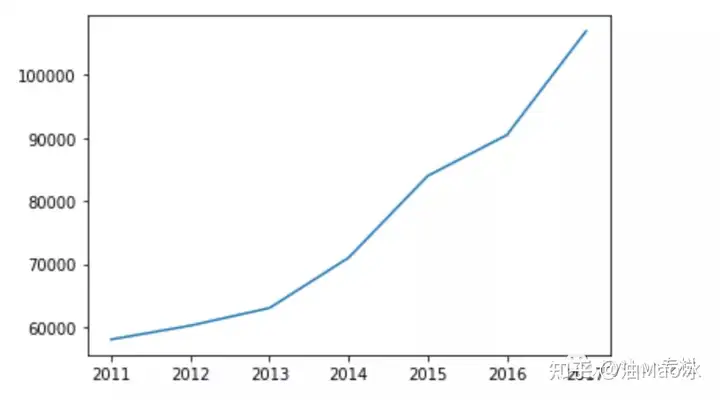
折线图用于分析自变量和因变量之间的趋势关系,最适合用于显示随着时间而变化的连续数据,同时还可以看出数量的差异,增长情况。
/ z6 T5 s; ]) s Matplotlib 中绘制散点图的函数为 plot() ,使用语法如下: matplotlib.pyplot.plot(*args, scalex=True, scaley=True, data=None, **kwargs)1) 简单的折线图
4 E0 \% [ F. O; o1 C7 a2 ]" f 在matplotlib面向对象的绘图库中,pyplot是一个方便的接口。
# E0 w2 i( G& _" h0 f/ C$ Y plot()函数:支持创建单条折线的折线图,也支持创建包含多条折线的复式折线图----只要在调用plot()时传入多个分别代表X轴和Y轴数据的list列表即可。 2 w' s' S. q( K. R
import matplotlib.pyplot as plt( k5 @- S3 q8 p) G
4 L' W* L# M, y
x_data = [2011,2012,2013,2014,2015,2016,2017]
5 G7 p' `0 P5 G$ I# z y_data = [58000,60200,63000,71000,84000,90500,107000]
; |( M) [7 K. M2 @) U+ w& j2 _* e, p6 \1 A
plt.plot(x_data,y_data)
6 X- K+ J3 c- I/ C5 F plt.show()- j0 j' T" o3 J5 {
0 ^* m) q1 R m$ t
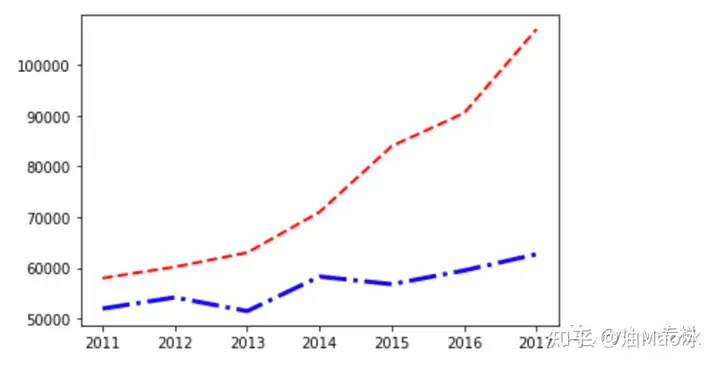
% ~* x: {* |8 C# ? 2)复式折线图: 3 P; X; G0 [3 Q/ i: U8 H" ?
import matplotlib.pyplot as plt r8 |& A. u' C) p' o7 I
x_data = [2011,2012,2013,2014,2015,2016,2017]% G" {; S2 b" ~' h/ @
y_data = [58000,60200,63000,71000,84000,90500,107000]- S3 M3 K9 y, U
y_data2 = [52000,54200,51500,58300,56800,59500,62700] D) P4 p6 e! k' a4 Z$ V
$ M8 ]( M" Y4 I plt.plot(x_data,y_data,color=red,linewidth=2.0,linestyle=--)
, P9 D" c4 N# I$ d0 u! v3 ~" \$ _ plt.plot(x_data,y_data2,color=blue,linewidth=3.0,linestyle=-.)( T" Y( a6 C/ J% d4 U& P
plt.show()- V* u5 Y8 l! \
& H, e3 ~, g4 \
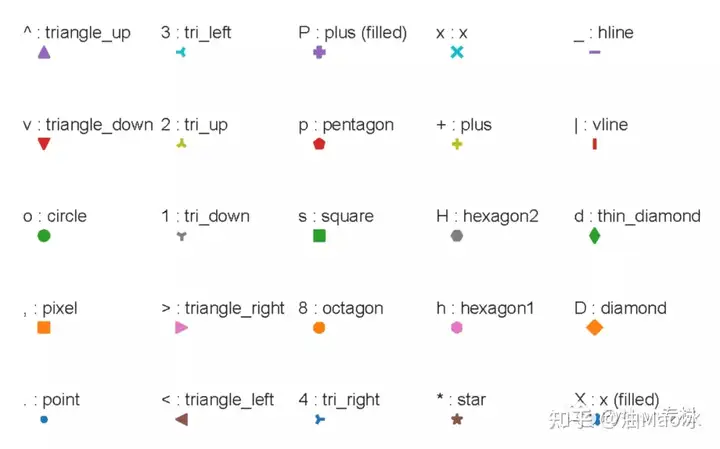
/ b; d1 L! u7 G" L& H, }6 i% M 注:说明:参数color=’ red ‘,可以换成color=’ #054E9F’,每两个十六进制数分别代表R、G、B分量,除了使用red、blue、green等还可以参照下图小白参数linestyle可以选择使用下面的样式: - solid line style 表示实线-- dashed line style 表示虚线-. dash-dot line style 表示短线、点相间的虚线: dotted line style 表示点线参数 linewidth 可以指定折线的宽度参数 marker 是指标记点,有如下的: * r' _" u9 E# I; q4 a
4 s) S" d& ]* c! H; A
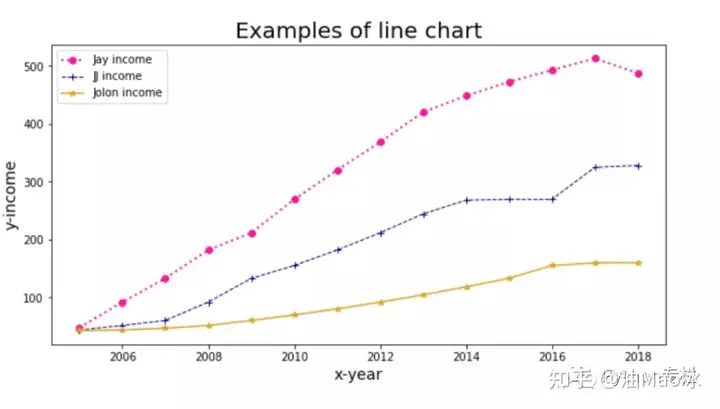
3) 管理图例 对于复式折线图,应该为每条折线添加图例,可以通过legend()函数来实现。该函数可传入两个list参数,其中第一个list参数(handles参数)用于引用折线图上的每条折线;第二个list参数(labels)代表为每条折线所添加的图例 1 s* R" Y( Z5 h& }
import pandas as pd( E1 p0 z( p( I3 b
import matplotlib.pyplot as plt
R! i b8 {, I/ J5 ]2 I7 F% r8 f7 i- l5 h8 N
#读取数据
2 {" b! d' H8 F3 N data = pd.read_excel(matplotlib.xlsx)
( j3 Z! X9 Z; Z2 W- G) H7 X& s6 f3 @) F0 n. x7 |8 v
plt.figure(figsize=(10,5))#设置画布的尺寸
3 U- X1 s+ J& [+ ?1 q plt.title(Examples of line chart,fontsize=20)#标题,并设定字号大小
) [- e2 J& A# P7 O# K6 ~! ? plt.xlabel(ux-year,fontsize=14)#设置x轴,并设定字号大小( G2 Y6 k6 ]5 P
plt.ylabel(uy-income,fontsize=14)#设置y轴,并设定字号大小( y3 m3 E/ ^$ Y4 b, N9 Z* Q
3 D3 u" I, O9 |: d6 V. y: ?2 I
#color:颜色,linewidth:线宽,linestyle:线条类型,label:图例,marker:数据点的类型
/ m6 H; @- a8 F in1, = plt.plot(data[时间],data[收入_Jay],color="deeppink",linewidth=2,linestyle=:, marker=o)7 U0 P0 Y$ U8 A1 v7 J( u
in2, = plt.plot(data[时间],data[收入_JJ],color="darkblue",linewidth=1,linestyle=--, marker=+)
# D8 B% |7 v4 \8 b in3, = plt.plot(data[时间],data[收入_Jolin],color="goldenrod",linewidth=1.5,linestyle=-, marker=*)9 A; q) o$ L2 D+ k0 N
' j- S4 a5 G) ]/ b; U! n& A7 B" g plt.legend(handles = [in1,in2,in3],labels=[Jay income,JJ income,Jolon income],loc=2)#图例展示位置,数字代表第几象限
) a/ B7 f6 ~! o" `8 U6 y plt.show()#显示图像3 d: B: O* |' {; _5 z4 H& v3 A& E
6 `3 P/ A. U: N% h0 N N( ~
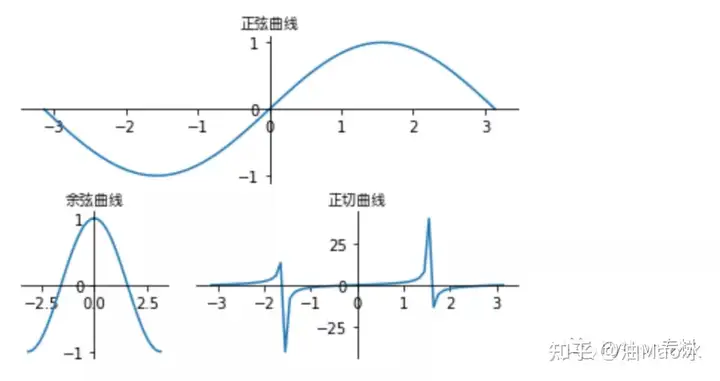
, ?* A' R: |/ a5 N% X& y- y/ {) V 4) 管理多个子图
6 S$ M6 Z( [+ h0 R import matplotlib.pyplot as plt
& O" V: [$ D8 Z1 Y7 }$ ? import numpy as np
: x: d/ y+ F3 @+ F9 A import matplotlib.gridspec as gridspec) n s1 I, `& R
import matplotlib.font_manager as fm #字体管理器
3 r7 e6 S) Q, Q3 n9 e0 c: |' V) z4 |8 m9 P$ [1 ^
my_font = fm.FontProperties(fname="/System/Library/Fonts/PingFang.ttc"); \; a; x: g9 [7 \# m, k
" g2 T4 j& Y0 k8 E: h" D, M& I
plt.figure()( ~; d2 s3 h0 Q3 c; A |$ |" o
& i' J L8 Z4 m: o% ] |8 O9 j7 x- e. Z
x_data = np.linspace(-np.pi,np.pi,64,endpoint=True)" b( z: W6 Y* |9 m
gs = gridspec.GridSpec(2,3) #将绘图区分成两行三列1 N6 [# i. N) m
ax1 = plt.subplot(gs[0,:])#指定ax1占用第一行(0)整行
) O* w- n9 ^4 X8 t! X- F ax2 = plt.subplot(gs[1,0])#指定ax2占用第二行(1)的第一格(第二个参数为0). Z" L2 m0 p; F' M6 R3 N
ax3 = plt.subplot(gs[1,1:3])#指定ax3占用第二行(1)的第二、三格(第二个参数为1:3)
* n5 C+ x1 G* X2 W/ j8 h: @+ j& T% a5 k5 V8 \, F( I' L2 A/ E8 Z
#绘制正弦曲线( a% H* j% f7 {5 H
ax1.plot(x_data,np.sin(x_data))
( F9 K, d4 S* y* `& e2 Q ax1.spines[right].set_color(none)* e1 c6 _3 E9 y
ax1.spines[top].set_color(none)! u& v0 B' t6 D$ M' ~; d
ax1.spines[bottom].set_position((data,0))
& y" i: a. `7 k ax1.spines[left].set_position((data,0))) c8 H3 [! r/ x: u& `
ax1.set_title(正弦曲线,fontproperties=my_font)& q7 j1 Y; j m
! Z X& x% l$ ?: b7 @ #绘制余弦曲线! p: X" I& z4 U# s6 z1 g0 J
ax2.plot(x_data,np.cos(x_data))5 }" K/ p2 N; h5 O0 V5 r
ax2.spines[right].set_color(none)8 V# Z, \7 B" @0 ?4 K4 w$ j! v7 @# c
ax2.spines[top].set_color(none)5 h( D& [! i e% L
ax2.spines[bottom].set_position((data,0))
/ t( f# E0 s( z5 c, C H+ {! p ax2.spines[left].set_position((data,0))
* d; Y' G2 K% g& E) x ax2.set_title(余弦曲线,fontproperties=my_font)
( c& i& f1 p$ f" k: W& T0 _
5 x+ |1 t b# f- O/ A0 X #绘制正切曲线
$ k# o- P5 H6 |" C4 a+ E3 X ax3.plot(x_data,np.tan(x_data))3 l1 X; K5 Q1 H6 k) }, d
ax3.spines[right].set_color(none)/ E4 |* I6 D9 A; H
ax3.spines[top].set_color(none)
7 s8 H' O7 O7 v! A9 b ax3.spines[bottom].set_position((data,0))( l4 z/ m, c. S4 \7 ^
ax3.spines[left].set_position((data,0))2 c& y- U; q% _8 J* u$ E
ax3.set_title(正切曲线,fontproperties=my_font)7 K5 i8 E) \8 D. ^- n
plt.show()
! w& w5 y/ X1 t% ]
/ y- a6 u! i" R, Q 结果: 4 U( U/ I0 Q; b; u4 `
( z" w; _! B. o& x
- c6 R! ?0 P0 z# ?4 n1 O; [, a0 g# P# w+ W
Z2 R+ T# d: J9 ^& T* k) X9 o# `2 `. U& F
4 N: h" _5 {; X9 J' Z" y
|